
Rapid Barcoding Kit 사용 시 barcode imbalance 해결 사례
안녕하세요,
박테리아 WGS는 제 주요 분야는 아니지만, 몇 차례 bacterial genome sequencing을 수행해야 했고 Rapid Barcoding Kit에서 정확히 동일한 문제를 겪었습니다.
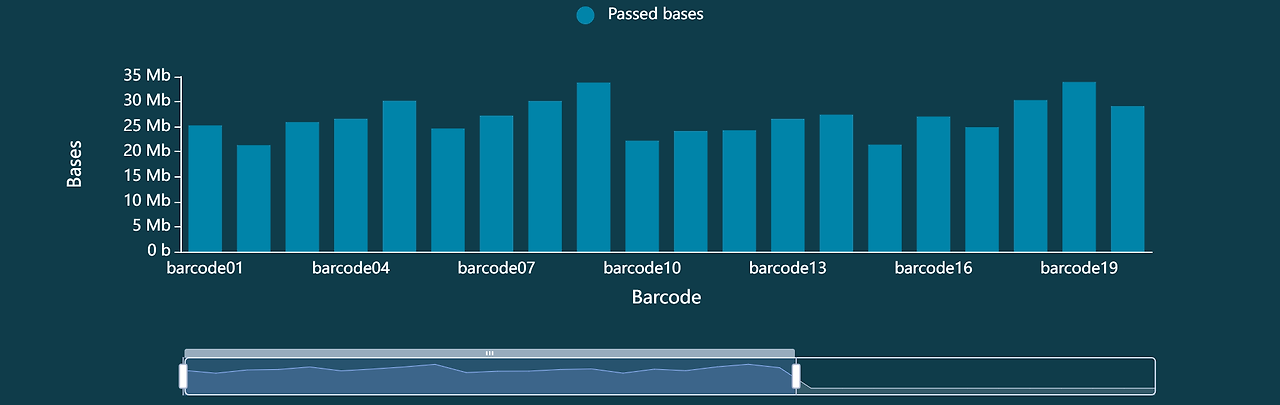
Qubit을 사용해 입력 DNA 농도를 동일하게 정규화했음에도 불구하고, 바코드별 read 분포는 여전히 매우 불균형했습니다. 샘플 간 차이가 심할 경우 5~10배까지 발생하기도 했습니다. 이러한 현상은 species와 관계없이 나타나는 것 같았으며, 저희는 S. aureus, E. coli, K. pneumoniae에서도 동일한 문제를 경험했습니다.
아래는 사전에 모두 동일한 농도로 normalization한 뒤, 20개 strain에서 얻은 barcode별 base distribution 예시입니다.

이 문제를 해결하기 위해, 저희는 barcode balance를 상당히 개선할 수 있는 작은 iterative protocol을 개발했습니다.
- Qubit 정량 후 모든 샘플을 동일한 농도로 normalization합니다.
(가장 농도가 낮은 샘플 기준으로 맞춤) - 각 샘플의 barcoding reaction을 비교적 큰 volume으로 수행합니다.
(예: reaction당 40 µL) - 이렇게 하면 나중에 다시 barcoding하지 않고도 샘플을 재사용할 수 있습니다.
- 각 barcoded sample에서 10 µL씩 가져와 library를 제작한 뒤,
Flongle 또는 세척한 flow cell에서 약 1시간 정도 짧게 sequencing을 수행합니다. - 이 pilot run에서 얻은 read/base count를 사용하여 barcoded sample을 다시 proportional하게 re-normalization합니다.예를 들어:
- barcode 06이 가장 약한 경우 → 최종 pool에 25 µL 사용
- 과대표현된 barcode 07 → 최종 pool에 4 µL만 사용
- 저희는 가장 yield가 낮은 barcode를 기준으로 단순 비례 계산을 적용합니다.
- 이렇게 re-normalization한 pool로 새로운 library를 제작하고,
새 flow cell에서 sequencing을 수행합니다.
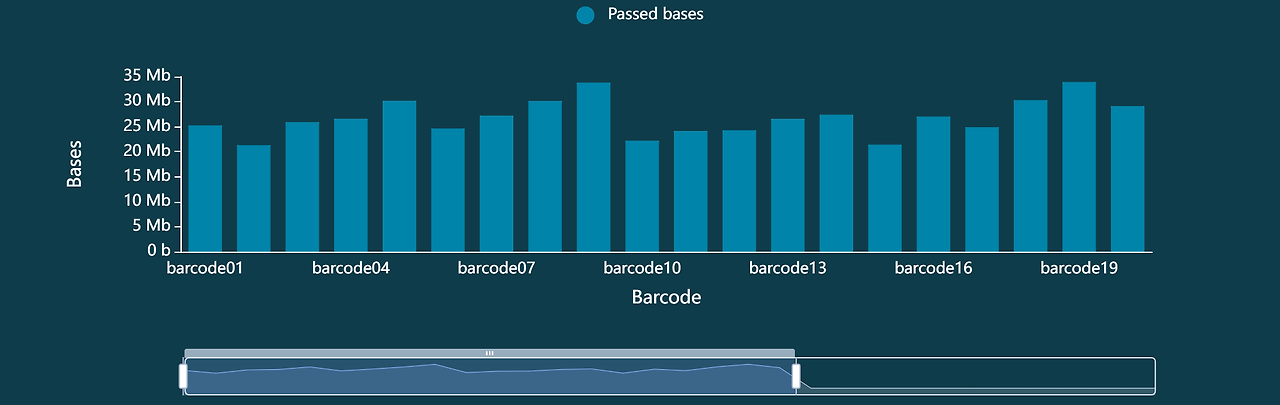
그리고 아래는 re-normalization 이후 동일 샘플들에서 얻은 barcode distribution입니다.
현재까지 이 방법을 몇 번 정도만 적용해 보았지만, 매번 꽤 고무적인 결과를 얻었습니다.
물론 추가 reagent가 필요하고 몇 시간 정도 더 소요되기는 하지만, 현실적으로 하루 안에 수행 가능한 수준이며, flow cell capacity를 훨씬 효율적으로 사용할 수 있게 해줍니다.
추가로, MinKNOW의 Barcode Balancing 옵션을 활성화하는 것도 sequencing 중 read imbalance를 줄이는 데 도움이 되는 것처럼 보였습니다. 다만 최근 추가된 “Run until Barcode Read Counts” 기능은 아직 테스트해보지 못해서 코멘트하기 어렵지만, 시도해볼 가치는 있을 것 같습니다.
도움이 되었기를 바랍니다.
감사합니다.
Etienne
Hi,
Bacterial WGS is not my primary area, but I've had to perform bacterial genome sequencing on a few occasions and ran into exactly the same issue with the Rapid Barcoding Kit.
Even after careful Qubit normalization to a fixed input concentration, barcode representation remains highly uneven, sometimes with 5-10× differences between samples. This seems to hold regardless of species (we've seen it with S. aureus, E. coli, and K. pneumoniae as well).
Here is an example of barcode distribution in bases across 20 different strains, all normalized to the same concentration beforehand:

To address this, we developed a small iterative protocol that significantly improves balance:
- Normalize all samples to the same concentration after Qubit quantification (normalized to the concentration of the weakest sample).
- Barcode each sample in a larger volume (e.g. 40 µL per reaction), so you can revisit them later without re-barcoding.
- Take 10 µL of each barcoded sample to prepare your library and run a short sequencing run (~1 hour) on a Flongle or a washed flow cell.
- Use the read/base counts from this pilot run to re-normalize the barcoded samples proportionally: we apply a simple proportionality calculation relative to the weakest barcode. For example, if barcode 06 is the weakest, it contributes 25 µL to the final pool, while an overrepresented barcode 07 might only contribute 4 µL.
- Prepare a fresh library from this re-normalized pool and sequence on a new flow cell.
And here is the barcode distribution for the same samples after re-normalization:
I've only applied this approach a few times so far, but results were encouraging each time. It does consume additional reagents and adds a few hours, but it can realistically be done within a single working day — and it ensures you're making full use of your flow cell capacity.
On top of that, enabling the Barcode Balancing option in MinKNOW also seemed to help in reducing read imbalance during the run itself. I have not yet tested the more recent "Run until Barcode Read Counts" feature, so I can't comment on that one, but it might be worth trying.
Hope this helps.
Cheers,
Etienne
https://community.nanoporetech.com/posts/barcode-imbalance-rapid-ba
'실험 시작 전에 알아두면 좋은 정보 > 문제 해결 (Trouble Shooting)' 카테고리의 다른 글
| MinION Mk1D, USB-A 포트 사용 가능할까? (0) | 2026.04.20 |
|---|---|
| Ubuntu 24.04(‘Noble’)에서 EPI2ME Desktop 실행 문제 및 해결 가이드 (0) | 2025.12.10 |
| 나노포어 FAQ (0) | 2025.09.12 |
| [Troubleshooting] 무척추동물 샘플에서 Pore occupancy가 낮을 때 해결 방법 (0) | 2025.08.20 |
| [Troubleshooting] Spot-ON 포트 로딩 실패 해결 가이드 (0) | 2025.03.20 |

